
Real Time Shipment Tracking for Logistics: Why Location Goes Missing
Real time shipment tracking gives you continuous or near-continuous location and status updates for a package or freight load, and you can check it right now by entering a tracking ID or asking your provider for a tracker ID or dashboard link. USPS audit data shows live data still has gaps, and we at Universal Shipping offer integrated visibility if you want a managed option.
TL;DR:
- In one audit period, USPS found 33% of delivery scans lacked GPS data, often because of blocked signals, older devices, or delayed uploads.
- Scan based tracking updates only when staff record events, while GPS devices report on a schedule; webhooks push updates promptly, unlike scheduled polling.
- Choose carrier APIs for a small carrier mix, an aggregator for many carriers, or an embedded tracking page when customer visibility must launch quickly.
- Pilot one steady lane for a few weeks, compare events with actual movement, measure location gaps, and assign an owner and response time to every alert.
- For most freight, hourly updates can track a load, while more frequent pings drain batteries faster; ask vendors how long they retain location history.
Table of Contents
- What real-time shipment tracking is and who uses it
- How real-time tracking works: events, telemetry, and data flow
- Why tracking sometimes lacks location data and how to interpret gaps
- Integration and implementation: adding real-time tracking to operations
- How to choose or evaluate a real-time tracking approach for your business
- What building tracking in the real world teaches you
- How Universal Shipping helps teams get integrated, real-time visibility
- FAQ
- Sources
What real-time shipment tracking is and who uses it
Think of real-time tracking as a running timeline for a shipment. Every handoff, scan, location ping and delay lands in one place, so you see where the freight is and what happens next instead of waiting for a delivery confirmation. The “real time” part is relative: some feeds update every few minutes from a GPS device, while others update only when a carrier employee scans a barcode.
Several groups rely on it every day:
- Shippers and brands use it to confirm freight is moving and to catch delays before customers do.
- Carriers and freight forwarders use it to prove handoffs and manage exceptions.
- 3PLs feed tracking data into warehouse and fulfillment dashboards.
- E-commerce teams use it to answer “where is my order?” questions without a phone call.
The most common use case is post-purchase tracking, where a buyer follows an order from checkout to doorstep. Freight visibility is the second: a logistics manager watches pallets, containers or full truckloads cross lanes and borders. The third is control tower monitoring, where a central team watches delivery performance across many carriers and lanes and acts on the exceptions.
Most platforms that rank well for this topic emphasize the same features. Multi-carrier coverage lets you track many carriers from one screen. Notifications push status changes to your inbox or phone. Branded tracking pages keep customers on your site instead of sending them to a carrier page. Estimated delivery updates recalculate as conditions change.
The payoff is practical. Fewer customers contact support asking where a package is, and your team spots a stalled shipment while there is still time to fix it. Market analysts have noticed: the Gartner Magic Quadrant for transportation visibility platforms evaluates vendors on how complete their vision and execution are, which signals how seriously buyers now treat integrated visibility.
How real-time tracking works: events, telemetry, and data flow
Every tracking timeline follows roughly the same path, whether the shipment is a parcel or a truckload:
- Acceptance. The carrier or forwarder takes custody and creates the first event, tied to a tracking ID.
- Scans and telemetry. Handheld scanners, vehicle telematics or attached trackers generate events as the shipment moves.
- Carrier or aggregator API. Those events flow to the carrier’s system, and often to an aggregator that collects many carriers in one feed.
- Backend processing. The platform cleans the data, converts each carrier’s status codes into one common vocabulary (event normalization), and removes duplicates.
- Dashboard and notifications. You see the result as a map, a timeline or an alert.
The scan type matters more than most people expect. A scan at pickup, a scan at a sorting hub and the final delivery scan carry different weight. The delivery scan, sometimes called the stop-the-clock scan, ends the service clock, which is why scan accuracy affects both customer experience and carrier performance reporting. The USPS Office of Inspector General explains that the Postal Service uses Mobile Delivery Devices (MDDs) with GPS and cellular networks to provide real-time delivery tracking, so a scan can carry a location as well as a timestamp.
Not every location comes from a scan. Dedicated GPS and cellular trackers report position on their own schedule, and IoT sensors can add temperature or shock readings. Research on the FMS-Freight pilot showed it is feasible to collect shipment GPS traces with smartphones and GPS loggers, then use machine learning to infer stops and travel modes even when GPS points are sparse.
How the data reaches you depends on the integration pattern:
- Direct carrier APIs connect to one carrier at a time. They give rich data but multiply the work as you add carriers.
- Aggregator APIs give you many carriers through one connection, with normalized events.
- Webhooks push each new event to your system the moment it arrives.
- Polling asks for updates on a schedule, which is simpler but slower and can waste requests.
- Auto-carrier detection guesses the carrier from the tracking number format, so customers can paste a number without picking a carrier first.
Webhooks are usually the better fit when freshness matters, and polling suits low-volume or low-urgency lanes. Whichever you choose, the integration is only as good as the events feeding it, which leads to the devices behind them.
Why tracking sometimes lacks location data and how to interpret gaps
If your tracking page shows a scan with no map pin, you are not imagining a problem. The USPS Office of Inspector General audit found that in one audit period, 8.3 million of 25.5 million delivery scans (33%) lacked corresponding GPS location data. The causes it identified were GPS signal obstruction and the use of legacy devices that do not support GPS, along with delays in uploading scan data.
GPS needs to hear from many satellites at once to reach roughly 10-meter precision, according to the USPS OIG audit, and plenty of ordinary places get in the way. Dense downtown streets with tall buildings (urban canyons) block and bounce signals. Tunnels and parking structures cut them off entirely. Even a carrier’s own body can interfere when a handheld is held close. When a fix is not available, a system may record no coordinates or fall back on manual location entry, which weakens automated visibility.
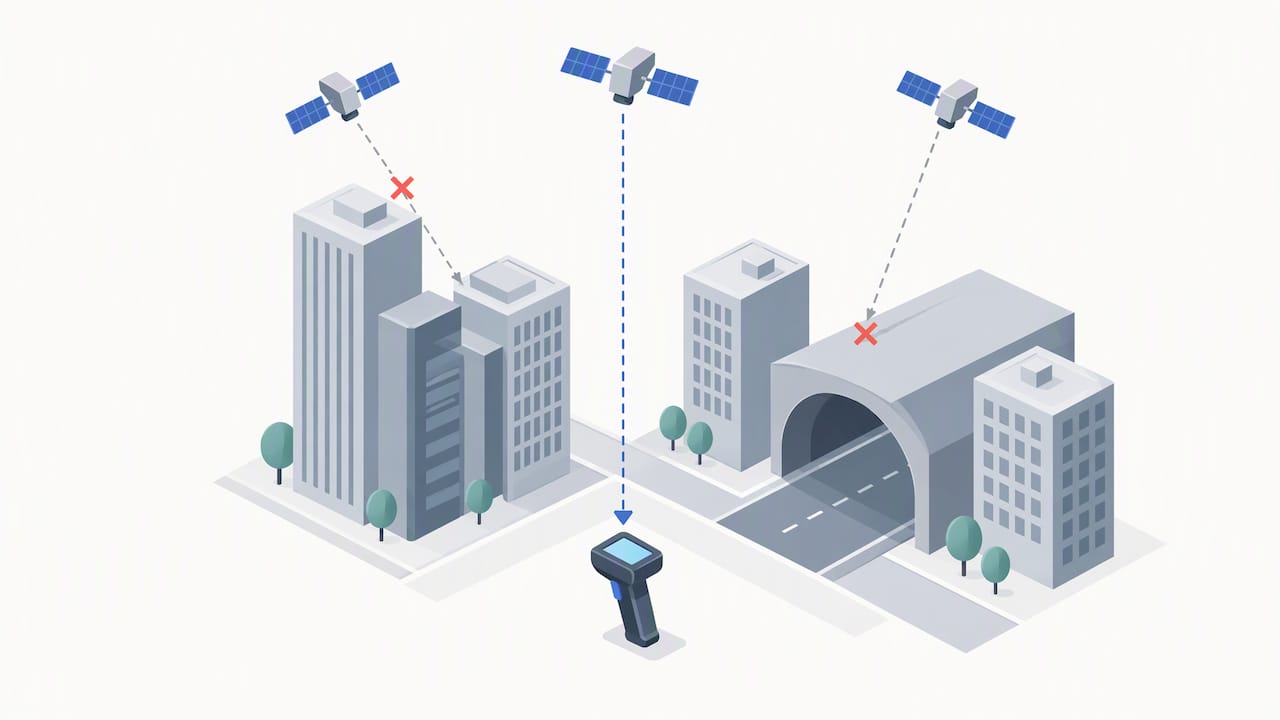
Timing creates a second kind of gap. A scan made at a customer’s door may not upload until the device reconnects, and after-hours scans can appear in batches the next morning. So a delivery can look “late” in the data while the package is already on the porch.
Here is how to read a gap sensibly:
- A missing pin on a final scan usually means a weak signal, not a lost package.
- A long silence between two scans suggests the shipment is in transit or waiting for an upload, not necessarily stuck.
- Repeated gaps at the same stop point to a hardware or location problem worth raising with the carrier.
Good visibility platforms show uncertainty honestly, with an estimated window rather than a false exact time.
Integration and implementation: adding real-time tracking to operations
Start by picking the integration path that matches your carrier mix. Carrier-native APIs work best when most of your volume rides with one or two carriers and you want maximum detail. Aggregator APIs suit shippers who use many carriers and want one normalized feed. Embedded tracking widgets are the fastest way to put a branded status page in front of customers, with the least engineering.
Next, settle the data model before you write code. Use one canonical tracking ID per shipment, even when the carrier changes along the way. Define an event taxonomy, a short, fixed list of statuses such as picked up, in transit, out for delivery, exception and delivered. Decide how you calculate ETAs and what thresholds trigger an alert, for example a shipment with no event for a set number of hours.
A pilot keeps the risk small:
- Choose one lane with steady volume and a known carrier.
- Connect the feed and compare events against what actually happened for a few weeks.
- Check how often scans arrive without location data, using the gaps described above as a baseline.
- Build a simple dashboard that shows on-time performance and open exceptions.
- Adjust alert thresholds, then add the next lane.
Your receiving process affects tracking quality too. Clean scan and ASN data at the dock keeps inventory and shipment records aligned, which we cover in our guide to advanced shipping notice data levels. If your goal is fewer late deliveries, our playbook on how to improve your on-time delivery KPI turns tracking data into targets. And for a central view across carriers, see how control tower logistics works.
Order flow matters as much as transport. A merch fulfillment workflow that ties tracking numbers to orders and returns is a useful model for smaller e-commerce teams, and large items need their own coordination, as this window and door delivery checklist shows.
How to choose or evaluate a real-time tracking approach for your business
Judge any option, whether a vendor, a carrier feed or an in-house build, against the same checklist:
- Carrier coverage: does it cover the carriers and modes you actually use?
- Reporting frequency: how often does location refresh, and how is a gap shown?
- Telemetry types: scans only, or GPS, temperature and shock data too?
- Data retention: how long are historical traces available?
- Security: how is access controlled, and who can see shipment data?
- Integration effort: how many weeks to connect your systems, and who does the work?
Ask a few direct questions during selection: what share of events arrive with location data, how late can events arrive, and what happens to alerts when a feed goes quiet? Run those questions again during the pilot using your own lanes.
Pro Tip: Test with your worst lane first, such as dense city deliveries or cross-border moves. If tracking holds up there, the easy lanes will take care of themselves.
A managed provider fits best when you want visibility without hiring integration engineers, or when freight forwarding, warehousing and delivery all need to share one view. Building in-house makes more sense when tracking is core to your product and you have the team to maintain it.
What building tracking in the real world teaches you
The strongest lesson I have taken from tracking projects is that more telemetry does not fix a weak process. A team with perfect GPS pings but no rule for what to do on a stalled shipment will still miss deliveries. Telemetry tells you something is wrong, and process decides what happens next. Pairing the two is where on-time performance improves. If you do one thing, write down who acts on each alert, and how fast. Teams that do this tend to see fewer where-is-my-order contacts and more reliable ETAs.
— Akbar
How Universal Shipping helps teams get integrated, real-time visibility
If you would rather not stitch together carriers, scanners and dashboards yourself, we handle it as part of the logistics work. Our freight forwarding services cover air, ocean and land freight with customs brokerage, and our 3PL fulfillment services connect warehousing and order processing to real-time tracking. Tell us your lanes and volumes, and we will discuss your visibility needs with you. Request a quote and we will take it from there.
FAQ
What is real-time shipment tracking?
Real-time shipment tracking shows a shipment’s current location and status as events happen, instead of only at delivery. Updates come from carrier scans, GPS devices and sensors, and appear in a dashboard or tracking page. How fresh the data is depends on the device behind it.
Why does my tracking show no location for some scans?
Most often the device could not get a clear GPS signal, or it uses older hardware without GPS. The USPS Office of Inspector General found that 8.3 million of 25.5 million scans in one audit period lacked GPS data. Upload delays can also hide a location for a while.
How often does real-time tracking update?
It depends on the source. Scan-based tracking updates only when a package is scanned, while dedicated trackers report on a set interval. A 2025 survey of commercial tracking tools lists minimum sample rates as frequent as one hour.
How do I add real-time tracking to my business?
Pick an integration path, such as carrier APIs, an aggregator API or an embedded widget. Then pilot one lane, check data quality and build a simple dashboard. Expand lane by lane once alerts and ETAs prove reliable.
Sources
Different devices supply very different data. Knowing which one sits behind a tracking event tells you how far to trust it.
- Package Delivery Scanning ― Nationwide | Office of Inspector General OIG
- Integrated Data Collection Method for Tracking Freight Movement
Reporting frequency is the main trade-off. A 2025 survey of commercial off-the-shelf tracking tools lists requirements such as reliable data reporting, global connectivity options (GSM, LTE, satellite, LoRaWAN and BLE), minimum sample rates as frequent as one hour, offline data storage and historical data access. Faster reporting drains batteries sooner, so a tracker that pings every few minutes needs a larger battery or more frequent charging than one that pings hourly. For most freight, an hourly or better sample rate is enough to follow a load across lanes without paying for constant pings.
Archival access is the feature people forget until a claim or a dispute arrives. Historical traces let you prove where a shipment was and when, so ask how long a platform keeps that data. The same survey notes that some vendor offerings provide at least 90 days of historical data access.