
3PL Onboarding Checklist: From Contract to Go-Live
A good 3PL onboarding has seven parts: define your requirements, clean up your product data, set up integrations, prepare packaging and shipping rules, move and receive inventory, run test orders, and watch the first 90 days closely. Most brands should plan for roughly 8 to 12 weeks, and nearly all delays trace back to integrations and data. The checklist below follows that order, so you can work down it and hand each block to the right person.
TL;DR
- Onboarding runs in this order: requirements, product data, integrations, packaging and shipping rules, inventory transfer, testing, go-live, stabilization.
- Plan for 8 to 12 weeks for a new brand. Integration work is the most common source of delay, so start it first.
- Name one source of truth for each data type (orders, inventory, shipments, returns, invoices) before any system is connected.
- Do not ship live volume until test orders have run the full cycle, from order placement through shipping and invoicing.
- Review exceptions daily for the first two weeks, then weekly through day 90.
Table of Contents
- Before kickoff: define what the 3PL must do for you
- Assign owners and build the timeline
- Product data and SKU setup
- Integrations: decide who owns which data
- Packaging, labeling and shipping rules
- Inventory preparation, transfer and receiving
- Testing before go-live
- Go-live and the first 90 days
- What the cost lines look like
- How we onboard fulfillment clients
- FAQ
- Sources
Before kickoff: define what the 3PL must do for you
Onboarding goes wrong when the brief is vague. Before the kickoff call, write down the answers to a short list of questions. Your provider will ask all of them anyway, and having them ready saves the first week.
Volume and profile
- Average and peak daily orders, and your busiest weeks of the year.
- Number of active SKUs, and how many are new each quarter.
- Typical order mix: single-unit parcels, multi-line orders, bulk or wholesale cartons, pallets.
- Sales channels: your own storefront, marketplaces, retail replenishment, Amazon.
Service levels
- Order cutoff time and how fast orders must ship after it.
- Carrier and service-level expectations, and any customer promises you make on delivery time.
- Returns policy and how returned items should be graded and restocked.
Commercial terms
- Which fees apply: receiving, storage, first pick, additional picks, packaging, returns and special projects.
- Billing cycle, invoice format and who approves disputes.
- Reporting you expect: inventory snapshots, shipping reports, on-time performance.
If you are still weighing whether outsourcing is right for your stage, our comparison of 3PL services versus in-house shipping lays out the trade-offs before you commit.
Assign owners and build the timeline
Every onboarding needs a named person on each side. On your side, that is usually an operations lead, someone who owns the ecommerce platform, and someone from finance. On the provider side, expect an onboarding manager and a contact for the warehouse floor.
Agree on three things in the first meeting:
- A written timeline with dates for data delivery, integration sign-off, inventory arrival, testing and go-live.
- A communication rhythm, such as a weekly call during setup and a shared channel for urgent issues.
- A go or no-go rule: the specific results that must be true before live orders move.
Benchmarks vary. One source puts the average for a new brand at 8 to 12 weeks, with complex setups running longer, and another says traditional onboarding ranges from 8 to 18 weeks depending on complexity. Treat these as planning ranges, not promises. Your own timeline depends on how clean your data is and how many systems must connect.
Product data and SKU setup
The warehouse cannot receive, store or pick what it cannot identify. Send a complete product file, ideally one spreadsheet or feed, with one row per SKU.
| Field | Why the warehouse needs it |
|---|---|
| SKU and barcode (UPC/EAN) | Matches received stock to your orders |
| Product name and variant attributes | Lets pickers confirm size, color and style |
| Length, width, height, weight (each unit and each case) | Drives storage allocation, carton selection and shipping cost |
| Units per case and cases per pallet | Used for receiving and replenishment |
| Lot, batch or expiration tracking needs | Required for FIFO or FEFO handling |
| Hazmat, fragile or oversize flags | Triggers special handling and carrier rules |
| Country of origin and HS code | Needed for international orders and customs paperwork |
| Value per unit | Used for insurance and customs declarations |
Check two things before you send the file. First, every SKU has a unique identifier with no duplicates across channels. Second, the dimensions are measured, not copied from a supplier sheet. Wrong dimensions cause the most common billing surprises, because shipping and storage charges follow what the warehouse measures.
Integrations: decide who owns which data
Integration is where onboarding time is won or lost. Delays arise almost entirely on the integration side, so start this workstream in week one, in parallel with everything else.
Begin with a data-flow map: what moves between your storefront, ERP or inventory system, and the warehouse management system, in which direction, and how often. Then define a source of truth for each entity: orders, inventory, shipments, returns and invoices. Without that decision, two systems can each treat themselves as the owner of the same data and overwrite each other, which produces update loops that are hard to debug.
A workable default looks like this:
- Orders: your storefront or ERP owns them and sends them to the warehouse.
- On-hand inventory: the warehouse system owns the count and sends it back to your channels.
- Shipments and tracking: the warehouse system owns them and returns tracking numbers to the order record.
- Returns: the warehouse records receipt and condition, and your system decides refund or exchange.
- Invoices: the provider’s billing system owns them, and finance reconciles against shipment data.
If you sell to large retailers or ship inbound freight with advance notices, confirm EDI requirements early. Our guide to ASN accuracy with EDI explains how mismatched notices lead to chargebacks.
On the tracking side, decide which events you want pushed to customers and to your team. Why shipment location goes missing is worth reading before you finalize alerts.
Packaging, labeling and shipping rules
This block turns your brand promise into instructions a picker can follow at speed.
- Packaging: specify box types, void fill, inserts, branded materials and what to do when an item does not fit the standard carton.
- Kitting and bundles: list the component SKUs for every bundle and how bundle stock is counted.
- Carrier rules: preferred carriers by weight band and destination, signature requirements, insurance thresholds and rules for PO boxes or APO addresses.
- Labels: return label format, packing slip content and any marketplace-specific label standards.
- Special orders: gift messages, personalization, wholesale cartons and pallets.
Write the rules as “if this, then that” statements. A picker should never have to guess. For palletized shipments, the five steps in how to palletize freight that passes LTL show what carriers expect, and the packing list requirements cover the paperwork that prevents holds.
Selling on Amazon too? Labeling errors are a common cause of receiving rejections, so review the FBA labeling checks and the Send to Amazon workflow before you route stock through the warehouse.
Inventory preparation, transfer and receiving
Inventory transfer is the most visible step, and it is where small errors become stock discrepancies that follow you for months.
Before the shipment leaves
- Count and reconcile what you hold today. Take a physical count at the source location, and freeze changes while cartons are packed.
- Label cartons with the SKU, quantity and a purchase order or reference number that matches your advance notice.
- Send an advance shipping notice listing every SKU and quantity, so the warehouse can plan dock time and storage space.
- Mix as little as possible. Cartons holding one SKU receive faster and with fewer errors than mixed cartons.
- Book the delivery slot. If the dock requires one, see how to book a delivery appointment and avoid fees.
At the dock
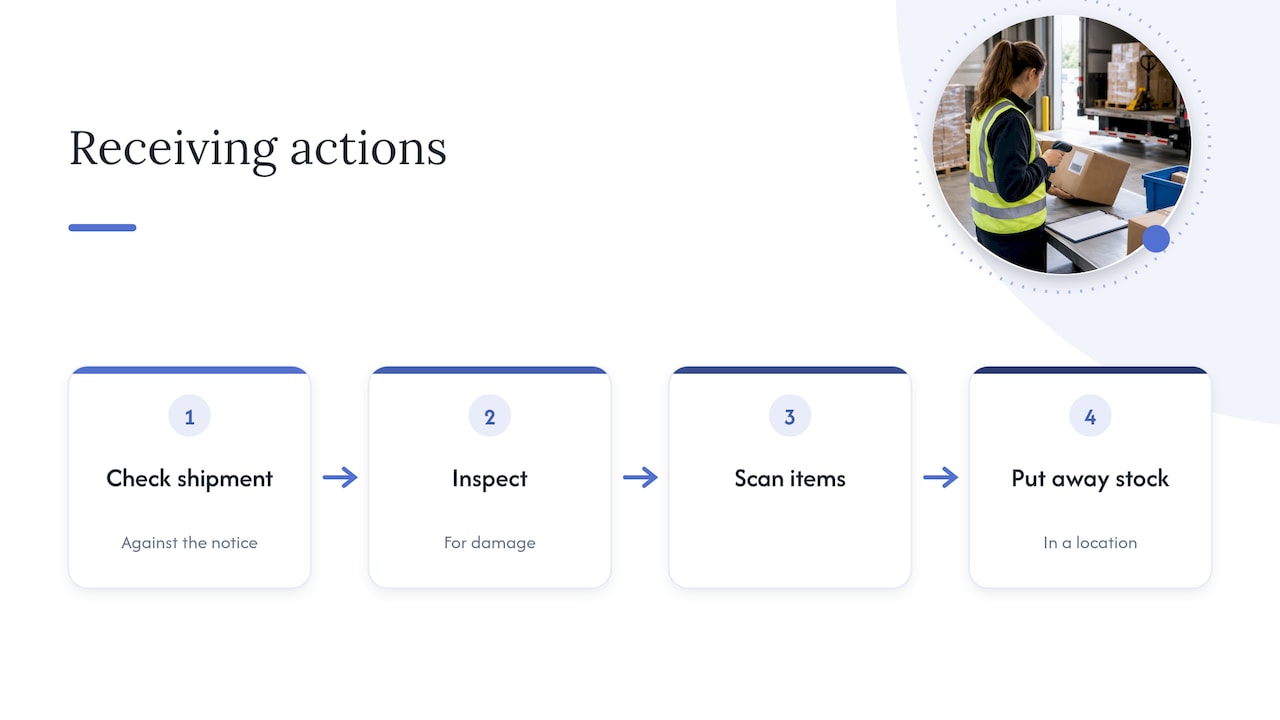
Receiving should check the shipment against the notice, inspect for damage, scan each item, and put stock in a location. Our warehouse receiving process guide walks through eight steps and a checklist you can hold your provider to.
After receiving
Ask for a receiving report within an agreed window. Compare the counts to your advance notice, investigate every variance, and agree on how discrepancies are resolved before live orders draw down the stock. Then schedule a cycle count a few weeks after go-live, so you catch drift early instead of at year-end.
If your goods arrive from overseas, align freight and customs steps with the warehouse plan. The freight forwarding process and the customs power of attorney checks help avoid port holds that leave a launch date waiting on a container.
Testing before go-live
Do not skip testing to save a week. A proper test plan has two layers.
Connectivity first. Before production volume, exchange and acknowledge sample messages between systems in a sandbox, whether EDI or API, then repeat in production.
Then the full cycle. Run test orders through the whole path, from order placement through shipping and invoicing. Build the test set to hit your real variety:
- A single-item order and a multi-line order.
- A bundle or kit.
- An order to a remote address and, if relevant, an international one.
- An order with a gift message or special packaging rule.
- A return of a sellable item and a return of a damaged one.
- An out-of-stock or partial-ship scenario.
For each test, confirm that the order arrived with the right data, the picker followed the right packing rule, the label and packing slip are correct, tracking reached your storefront, inventory decremented in every system, and the invoice matches the rate card. Sign off in writing against the go or no-go rule you set at kickoff.
Go-live and the first 90 days
Many teams move orders over in stages: one channel, one product line, or a percentage of volume first, then the rest as results hold. That limits the damage if something was missed.
In the stabilization period, track integration health and operational exceptions, especially during the first two weeks. Keep a running log of:
- Rejected orders and unmapped SKUs.
- Delayed stock updates and manual corrections.
- Label failures and missing tracking numbers.
- Customer support tickets tied to fulfillment.
For each issue, record the cause and the permanent fix, not only the quick patch. A simple rhythm works well:
| Period | Review cadence | Focus |
|---|---|---|
| Days 1 to 14 | Daily | Exceptions, order accuracy, same-day shipping |
| Days 15 to 45 | Twice weekly, then weekly | Inventory accuracy, carrier performance, returns handling |
| Days 46 to 90 | Weekly, then monthly | Invoice reconciliation, cycle counts, forecasts for the next peak |
At day 90, hold a formal review. Compare real volume, cost per order and accuracy to what you planned, and update the rate card or rules where reality has moved.
What the cost lines look like
Onboarding is easier when you know which fees you will see. Our published pricing lists receiving per container, order processing for the first pick and label, additional picks, returns, packaging, and storage. Storage is listed at $5 to $6 per bin per month and $17 to $19 per pallet per month, and additional services are billed at $37 per hour. Use these lines to build a month-one budget and compare it with your own quote.
Perspective
In our experience the checklist is the easy part. The hard part is that transportation, warehousing and systems are often handled by three different parties, and each handoff is where data gets lost. That is why we built Universal Shipping around one platform: freight forwarding, customs, warehousing and fulfillment under one roof, with real-time tracking and one team to call.
When the inbound freight, the receiving and the pick-and-pack sit with the same provider, the advance notice, the dock appointment and the stock count describe the same shipment. That removes a whole category of onboarding delay.
Our advice is to treat onboarding as a shared project with a named owner on each side, not a handoff. Bring your cleanest data, agree on the source of truth early, and test until the invoice matches the shipment. Brands that do this tend to go live calmly instead of firefighting.
Akbar
How we onboard fulfillment clients
If you are ready to move from checklist to plan, our 3PL fulfillment services cover receiving, storage, pick and pack, returns and shipping from our US warehouses, with freight forwarding and customs brokerage available when your stock starts overseas. We designed the setup around real-time tracking and personalized service.
For ecommerce brands selling across several channels, see our omnichannel and ecommerce fulfillment service, or review the pricing page to size your first month. To talk through your SKU count and timeline, start from usiship.com.
FAQ
How long does 3PL onboarding take?
Plan for about 8 to 12 weeks for a new brand, with complex setups taking longer. Clean product data, simple integrations and a ready inventory shipment shorten it. Late data and custom connectors lengthen it.
What should I prepare before onboarding starts?
Have your volume and peak forecasts, a full SKU file with measured dimensions and barcodes, packaging and carrier rules, returns policy, and a list of the systems that must connect. Name your internal owners for operations, ecommerce and finance as well.
What do test orders need to prove?
They need to prove the full cycle works: the order arrives correctly, is picked and packed to your rules, ships with the right label, sends tracking back, reduces inventory everywhere and produces a correct invoice. Test a full cycle from order to invoicing before moving live volume.
What should I monitor after go-live?
Watch rejected orders, unmapped SKUs, delayed stock updates, manual corrections, label failures, missing tracking numbers and support tickets. The first two weeks matter most, so review them daily and fix root causes.
Can I transition from one 3PL to another without stopping sales?
Yes, with planning. Stage the move by channel or product line, keep the old provider shipping until the new one passes testing, and reconcile counts before you transfer the stock. Agree on the cutover date in writing with both providers.
Sources
- 3PL Customer Onboarding: How to Cut Integration Time by 60%
- Integration Debt in Logistics: How It Slows 3PL Growth
- How to Integrate 3PL Systems with Client E-Commerce Platforms
- 3PL Onboarding Checklist: Integrations, Inventory, SOPs and Tests
- Enterprise 3PL Client Onboarding: Repeatable Launches