
Two Week Pick and Pack Pilot to Cut Errors and Injuries in Warehouses
The pick and pack process is the sequence of picking items from storage, packing them into shipment-ready boxes, and staging them for carrier pickup. Get it right and you see fewer shipping errors, faster cycle times, and lower cost per order. Get it wrong, and every other supply chain metric downstream suffers. The levers that matter most are warehouse layout, picking method, verification steps, and the technology tying it together.
TL;DR:
- Using a validated order check at receipt prevents backorders, address issues, and fraud holds from disrupting the pick flow.
- Combining batch and piece picking based on SKU velocity and order complexity can optimize cycle times and error rates.
- Ensuring pack stations have the right size boxes, proper cushioning, and final scans reduces shipping costs and errors.
- Automating pick-path sequencing and barcode scanning with a stable process improves accuracy and minimizes manual entry mistakes.
- Tracking multiple KPIs, including accuracy, cycle time, and cost per order, helps identify bottlenecks and avoid misleading metrics.
Table of Contents
- What Are the Core Stages of the Pick and Pack Process?
- Which Picking Method Fits Your Order Profile?
- What Makes a Packing Station Efficient?
- Which Technology Actually Improves Pick and Pack Accuracy?
- What KPIs Should You Track in Pick and Pack Operations?
- How Should You Apply OSHA Guidance to Reduce Picker Injuries?
- How Do You Design a Pick and Pack Optimization Pilot?
- What Mistakes Should You Watch For in Pick and Pack Operations?
- Why an Integrated Logistics Approach Changes Pick and Pack Outcomes
- Run Your Pick and Pack Pilot With Usiship
- Sources
- FAQ
What Are the Core Stages of the Pick and Pack Process?
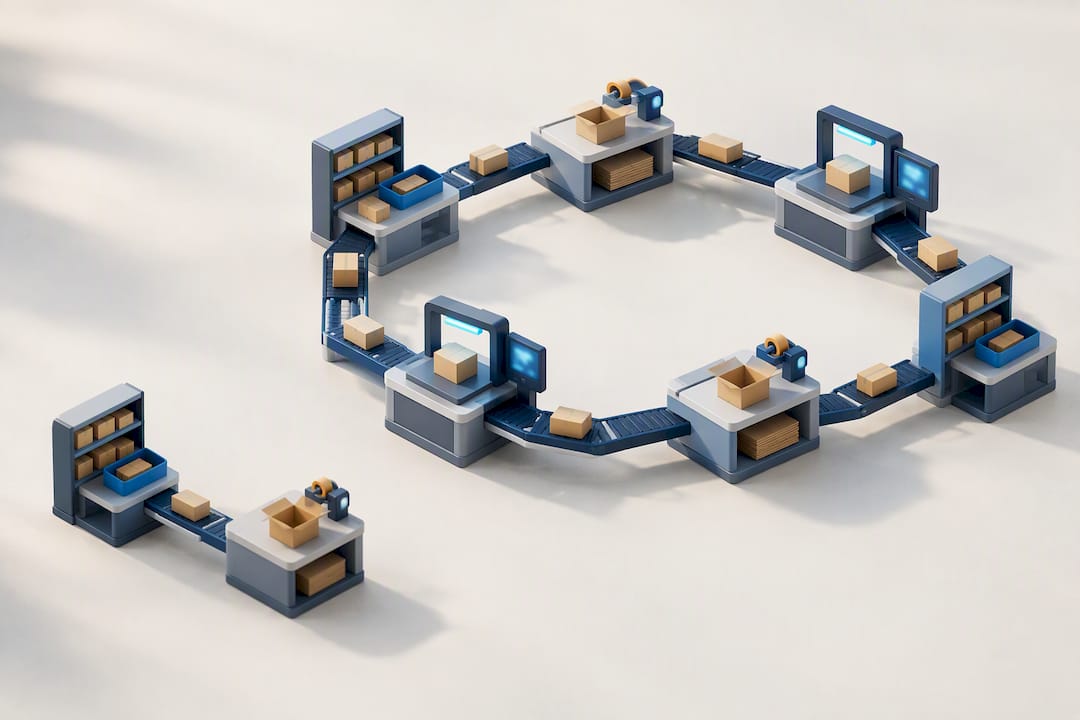
Every pick and pack process runs through four stages, and weak points tend to cluster at the handoffs between them rather than inside any single stage. Auditing your flow means checking each transition, not just each task.
- Order validation at receipt. Incoming orders get checked against inventory availability, shipping address completeness, and payment status before they ever generate a pick ticket. Exceptions (backorders, address flags, fraud holds) should route to a separate queue instead of clogging the main pick flow.
- Pick-ticket generation and pick-path handoff. The warehouse management system (WMS) converts validated orders into pick lists, ideally sequenced by warehouse location rather than order number, so a picker walks a logical route instead of zig-zagging across zones.
- Packing station execution. The picked items arrive at a station where staff select the right box, add protective material, include a packing slip, and apply a shipping label that matches the carrier’s specifications.
- Staging and shipping. Packed orders get grouped by carrier and cutoff time, then manifested. Staging by carrier and departure window, paired with a final scan or weight check, is one of the more reliable ways to cut shipping errors before they leave the building.
The most common failure point isn’t any of these four stages individually. It’s the gap between picking and packing, where mis-picks go undetected because nobody scans before the item hits the box.
Which Picking Method Fits Your Order Profile?
Piece picking, batch picking, zone picking, and wave picking solve different problems, and picking the wrong one for your order mix creates more work than it saves.
- Piece picking (one order, one picker, start to finish) wins when order volume is low and orders are complex or customized. It’s slow per unit but has almost no coordination overhead, which makes it forgiving for small operations or high-touch B2B orders.
- Batch picking groups multiple orders so a picker collects several SKUs in one pass. It cuts travel time when order lines are similar and SKU velocity is predictable, but its value depends entirely on SKU velocity, order-line similarity, and sortation cost — batch too aggressively and you shift the bottleneck from walking to sorting.
- Zone picking assigns pickers to fixed areas and passes orders between zones. It scales well for large warehouses but needs tight handoff coordination or orders stall between zones.
- Wave picking releases groups of orders on a schedule tied to carrier cutoffs, which helps align picking output with shipping deadlines rather than just warehouse convenience.
Pro Tip: Don’t commit to one method warehouse-wide. Run a two-week pilot comparing your current method against batch picking on your top 20% velocity SKUs only, and measure cycle time and error rate separately before rolling it out further.
Most mature operations end up running a hybrid: batch picking for fast-moving, similar-line orders, and piece picking for the long tail of custom or low-volume items.
What Makes a Packing Station Efficient?
A packing station should let a worker complete a box from pick tote to sealed label without walking more than a step or two. Modular templates, where box sizes, tape, and label printers sit in the same configuration at every station, cut training time and reduce the chance a packer grabs the wrong material.
- Keep at least three box sizes plus poly bags on hand, since a single oversized box is one of the fastest ways to trigger dimensional weight (DIM) surcharges from carriers.
- Match cushioning to fragility, not habit. Overpacking every order in bubble wrap protects nothing extra on durable goods and adds weight that inflates shipping cost.
- Perform a final scan or weight check at the pack station before sealing, and always include a packing slip, even for orders with no returns policy quirks.
- Check carrier label specs before printing in bulk. Wrong label placement, missing tracking barcodes, or incorrect service codes are among the top reasons carriers reject packages at the dock.
A good rule for professional-grade packing: treat every fragile item the way movers treat furniture, with dedicated corner protection and void fill rather than a shared box with heavier goods. Professional packing standards built around fragile-item handling translate directly to e-commerce packing stations, even outside the moving industry.
Which Technology Actually Improves Pick and Pack Accuracy?
A WMS earns its cost when it handles order release rules, slotting logic, and pick-path optimization automatically instead of relying on a supervisor’s memory. Before shopping for automation, confirm your process is stable enough to benefit from it. Technology should follow process maturity, not replace it.
- WMS must-haves: automated pick-path sequencing, real-time inventory sync, and packing rules that flag box size by order weight and dimensions.
- Barcode reliability matters more than most managers assume. GS1 US recommends testing barcodes as printed, not as displayed on a screen, since printer settings, paper finish, and label placement cause most scanning failures in live operations.
- Low-cost tech first: handheld scanners and wearable ring scanners deliver strong accuracy gains without capital investment in conveyors or pick-to-light systems.
- Advanced automation (pick-to-light, sortation conveyors) pays off only at volume where labor savings outpace the equipment cost. Pilot on one zone before a facility-wide rollout.
- Carrier label and manifest integrations that auto-select the cheapest eligible service cut both manual entry errors and shipping cost.
A combined WMS and wearable scanner rollout in one case produced significant throughput and accuracy gains for a fulfillment operation, as documented in an industry case study — useful as a directional benchmark, not a guaranteed outcome for every warehouse.
What KPIs Should You Track in Pick and Pack Operations?
Picks per labor hour is the metric everyone tracks and the one most likely to mislead you if it’s the only number on the dashboard. A warehouse can post record picks per hour while accuracy quietly drops, because pickers are rushing scans or skipping verification.
- Picks per labor hour — throughput baseline, but never read alone.
- Pick accuracy — the percentage of orders picked without error before packing.
- Orders per hour — a packing-station equivalent of picking throughput.
- Cost per order — labor, packaging, and shipping cost divided by order volume.
- Cycle time — the span from order release to carrier handoff.
A fuller KPI set also tracks pack-station utilization, damage rate, short shipments, and inventory adjustment frequency, then segments every number by SKU family, picking method, and shift. A single warehouse-wide average can hide the fact that one shift or one SKU family is dragging the whole number down.
When you run a pilot, give it enough volume to matter. A two-day test on 50 orders tells you almost nothing about how a picking method performs at real scale; measure over at least one full weekly cycle before changing a permanent process.
How Should You Apply OSHA Guidance to Reduce Picker Injuries?
Ergonomics in pick and pack operations is a safety issue and a productivity issue at the same time, because the same design choices that protect a picker’s back also keep them moving at a consistent pace all shift.
- Keep item pick weights under 10 pounds, and under 2 pounds for pinch-grip items, per OSHA guidance.
- Keep totes at manageable weights and raise pallets for case picking to avoid excessive bending
- Adjust workstation height to the worker, not a fixed standard. Elbow-height packing surfaces reduce shoulder strain over an eight-hour shift.
- Use mechanical aids (lift-assist devices, pallet jacks, rotating bins) and rotate staff between picking and packing tasks to limit repetitive-motion exposure.
- Follow safe stacking heights and powered industrial truck practices when handling palletized freight, since unstable stacks create fall and crush hazards on top of ergonomic strain.
Pro Tip: Slot your heaviest, highest-velocity SKUs at waist to elbow height, closest to the pack station. It cuts both injury risk and travel distance in one move, since the picks you make most often are the ones costing the most in walking time and lifting strain.
How Do You Design a Pick and Pack Optimization Pilot?
Optimization tactics only work when tested in a controlled pilot, because a change that looks good on paper can create a bottleneck somewhere you weren’t measuring.
- Define scope and KPIs before you touch the floor. Pick one zone or SKU family, set a minimum two-week sample, and lock in the metrics you’ll judge success by (cycle time, accuracy, cost per order) before making any change.
- Set slotting rules that balance velocity and ergonomics. Place your fastest-moving, heaviest items at waist height near the pack area, and revisit slotting monthly rather than annually, since e-commerce demand shifts faster than an annual review can track.
- Test batching and sequencing rules on a limited SKU set first. Batching reduces travel time but can create sortation congestion if order-line similarity is low, so measure both walking time and pack-station wait time in the same pilot.
- Build a continuous improvement cadence. Update standard operating procedures (SOPs) after every pilot cycle, not just after major failures, and treat small weekly adjustments as normal rather than exceptional.
For inventory-heavy operations, pairing slotting rules with structured inventory management practices helps keep pick paths short even as SKU counts grow.
What Mistakes Should You Watch For in Pick and Pack Operations?
The most damaging mistakes are quiet ones: skipping a verification scan to save ten seconds, buying automation before the process is stable, or running a warehouse with no KPIs beyond “orders shipped today.”
- No baseline KPIs before making process changes.
- Skipping pack-station verification to hit a shipping cutoff.
- Slotting by product category instead of velocity and weight.
- Buying technology to fix a process problem instead of fixing the process first.
| Signal | What It Usually Means |
|---|---|
| Rising pick errors over 2+ weeks | Slotting drift or inadequate pick-path sequencing |
| Injury reports clustering at one station | Workstation height or tote weight exceeding safe limits |
| Cost per order climbing without volume change | Packaging oversizing or inefficient carrier selection |
Why an Integrated Logistics Approach Changes Pick and Pack Outcomes
Most warehouses treat receiving, picking, and shipping as separate problems, which is exactly why errors hide at the handoffs between them. When inbound planning, carrier sequencing, and fulfillment sit on one platform, you get visibility across every stage instead of three disconnected reports. In-house optimization makes sense once your volume is stable and predictable. Once demand gets seasonal or SKU counts spike, piloting an external 3PL against your in-house numbers with the same KPI targets tells you fast whether outsourcing pays for itself.
— Akbar
Run Your Pick and Pack Pilot With Usiship
You can consider a warehouse partner that runs receiving, order processing, and packaging as connected services rather than separate vendors you have to coordinate yourself.
A practical way to start is a small-scope pilot: RECEIVING (PER CONTAINER) for inbound goods, ORDER PROCESSING (1ST PICK & LABEL) for the fulfillment step, and PACKAGING for outbound preparation, with a set of KPI targets you already track internally so you can compare results directly. If you sell on Amazon, the same pilot structure extends into FBA prep and last-mile delivery without adding a second vendor relationship. Before committing, ask any 3PL partner three questions: how their system integrates with your existing order management setup, what SOPs govern pick accuracy and packing verification, and what service-level agreements cover cycle time and error rates. Usiship’s 3PL fulfillment services page covers exactly this ground. Full pricing for storage, additional picks, and returns handling is listed on the pricing page, or you can reach out directly to scope a pilot for your SKU mix.
Sources
- Warehousing – Hazards and solutions | OSHA
- Order batching: What it is, common methods and benefits | Inbound Logistics
- GS1 US Barcode Capabilities Test Kit
- A step-by-step guide to the pick and pack process and how to optimize it | Racklify
- How eShipper+ boosted fulfillment efficiency by 73% | Inbound Logistics
FAQ
Is Picker Packer a Hard Job?
Picker and packer roles are physically demanding rather than technically complex, involving repetitive lifting, walking, and standing for full shifts. OSHA’s warehousing guidance exists specifically because these roles carry real musculoskeletal risk, which is why weight limits and ergonomic workstation design matter as much as speed.
What Are the Steps in the Receiving Process?
Receiving typically involves unloading inbound freight, verifying the shipment against the purchase order, inspecting for damage, counting and logging items into inventory, and putting stock away in its assigned warehouse location. Skipping the verification step is one of the most common sources of inventory discrepancies that surface later in picking.
What Are the Steps of the Order Fulfillment Process?
Order fulfillment runs from order receipt and validation, through pick-ticket generation, picking, packing, quality verification, staging by carrier, and finally shipping and tracking handoff. Staging by carrier and departure window with a final QC check reduces shipping errors before packages ever leave the warehouse.
What Skills Are Needed for a Picker and Packer Job?
Picker and packer roles require attention to detail for accurate scanning and order matching, physical stamina for lifting and walking, and basic comfort with handheld scanners or WMS terminals. Familiarity with safe lifting technique and carrier labeling requirements also reduces both injury risk and shipping errors on the job.
How Much Does Usiship Charge for Pick and Pack Services?
Storage runs $5 to $6 per month per bin or $17 to $19 per month per pallet, and additional services beyond standard fulfillment are billed at $37 per hour, all listed on the Usiship pricing page. Pricing for receiving, order processing, and packaging is available on request through the same page.